
NAVO
SupportHelp

Support

  • Support home
  • User manual
  • All guides

Get started

  • First-time setup
  • Turn on & use the buttons
  • Pair with iPhone
  • Pair with Android
  • Set the time
  • Wake up & navigate
  • Use your watch off the course

Play golf

  • Start a round
  • Understand the golf screen
  • Read GPS distances
  • View hazards
  • Use Green View
  • Keep your score
  • Measure a shot
  • Use Slope Mode
  • Use the golf menu & finish a round

Fix a problem

  • Distances look wrong
  • My watch will not turn on
  • GPS is still searching
  • I cannot find my course

Care & updates

  • Battery & charging
  • Fasten & tuck the strap
  • Water resistance & care
  • Update or find a golf course

Resources

  • FAQ
  • Firmware updates
  • Replacement parts

Need more help?

Contact supportSend us your question directly.
Browse helpCurrent: Fasten & tuck the strap

Support

  • Support homeChoose a task or find help with a problem.
  • User manualRead the illustrated guide or download the PDF.
  • All guidesBrowse every NAVO W1 guide.

Get started

  • First-time setupCharge, turn on, and choose language and units.
  • Turn on & use the buttonsPower on, wake the display, and use both buttons.
  • Pair with iPhoneConnect to NAVO Golf and enable permissions.
  • Pair with AndroidConnect to NAVO Golf and enable permissions.
  • Set the timePhone sync, GPS time, daylight saving, and manual time.
  • Wake up & navigateUnderstand swipes from the clock and during golf.
  • Use your watch off the courseWatch faces, Quick Settings, and round history.

Play golf

  • Start a roundFind GPS, select your course, and choose a starting hole.
  • Understand the golf screenDistances, swipe directions, and tap shortcuts.
  • Read GPS distancesFront, middle, and back of the green explained.
  • View hazardsRead full hazard names and front/carry distances.
  • Use Green ViewMove the pin to check the distance to the flag.
  • Keep your scoreStrokes, putts, FIR, GIR, and your scorecard.
  • Measure a shotMeasure from where you hit to where the ball finishes.
  • Use Slope ModeSwitch elevation-adjusted distances on or off.
  • Use the golf menu & finish a roundOpen tools, change brightness, and exit the game.

Fix a problem

  • Distances look wrongCheck the hole, GPS, Slope, units, and course data.
  • My watch will not turn onCheck power-on, charging contacts, and USB power.
  • GPS is still searchingFind GPS outdoors or follow the update-and-reset steps.
  • I cannot find my courseSearch for an update or request missing course data.

Care & updates

  • Battery & chargingCharge correctly and check a watch that will not turn on.
  • Fasten & tuck the strapThree illustrated steps and replacement band compatibility.
  • Water resistance & careClean, rinse, and dry your watch.
  • Update or find a golf courseInstall course updates or report a missing course.

Resources

  • FAQQuick answers to common questions.
  • Firmware updatesUpdate your watch and see what has changed.
  • Replacement partsShop replacement straps and chargers.

NAVO W1 · Watch guide

Fasten & tuck the strap

The strap tail passes through the opening and tucks underneath the band.

Start hereWrap the watch around your wrist without pulling the strap tight.

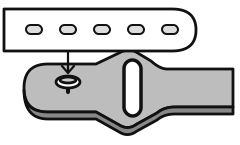
  1. Press the pin into a comfortable strap hole

    1 Fasten the pin

    Press the pin into a hole that gives a comfortable fit.
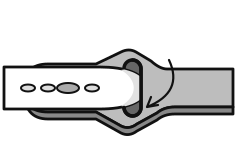
  2. Slide the white strap tail through the rounded opening in the gray band

    2 Pass through the opening

    Guide the free end through the rounded opening beside the pin.
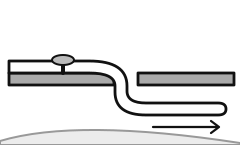
  3. Tuck the strap tail underneath the band

    3 Tuck underneath

    Slide the tail underneath the band so it rests flat against your wrist.

If the tail is difficult to tuck

Choose a looser hole and try again. Leave enough room to slide the tail underneath easily.

Replacing the band

NAVO W1 is compatible with standard 22 mm quick-release watch bands.

See available NAVO replacement straps.

Related guides

Water resistance & careClean, rinse, and dry your watch.Turn on & use the buttonsPower on, wake the display, and use both buttons.
PreviousBattery & chargingNextWater resistance & care

Product

  • NAVO W1
  • Golf GPS Watch
  • Download app

Guides

  • Best Golf GPS Watch
  • Garmin Comparison
  • No-Subscription Guide

Support

  • Support home
  • Features & guides
  • User manual PDF
  • Firmware changelog
  • Request a course update
  • Replacement parts
  • Contact

Company

  • About
  • Privacy policy
  • Delete account
  • Terms of service

NAVO

Ready to play. A simple golf GPS watch with clear distances, essential stats, and no subscription.

© 2026 NAVO. All rights reserved.

Follow NAVO

InstagramYouTube